- UX for AI
- Posts
- What SOC Agents Can Learn from Claude-in-Chrome's Growing Pains
What SOC Agents Can Learn from Claude-in-Chrome's Growing Pains
The Chrome Web Store is not where you'd expect to find a blueprint for what's broken in agentic security tooling. But it offers an exceptional glimpse into Agentic AI's growing pains. Claude-in-Chrome — built by arguably the most safety-focused AI lab in the world — sits at 2.7 stars. Read enough of the reviews, and you stop seeing a product failing. You start seeing a category failing. The same patterns show up in every SOC agent deployment I've encountered. The browser just makes them impossible to ignore.

Greg Nudelman
April 08, 2026
Featured UX Bug: The permission dialog that tells you nothing
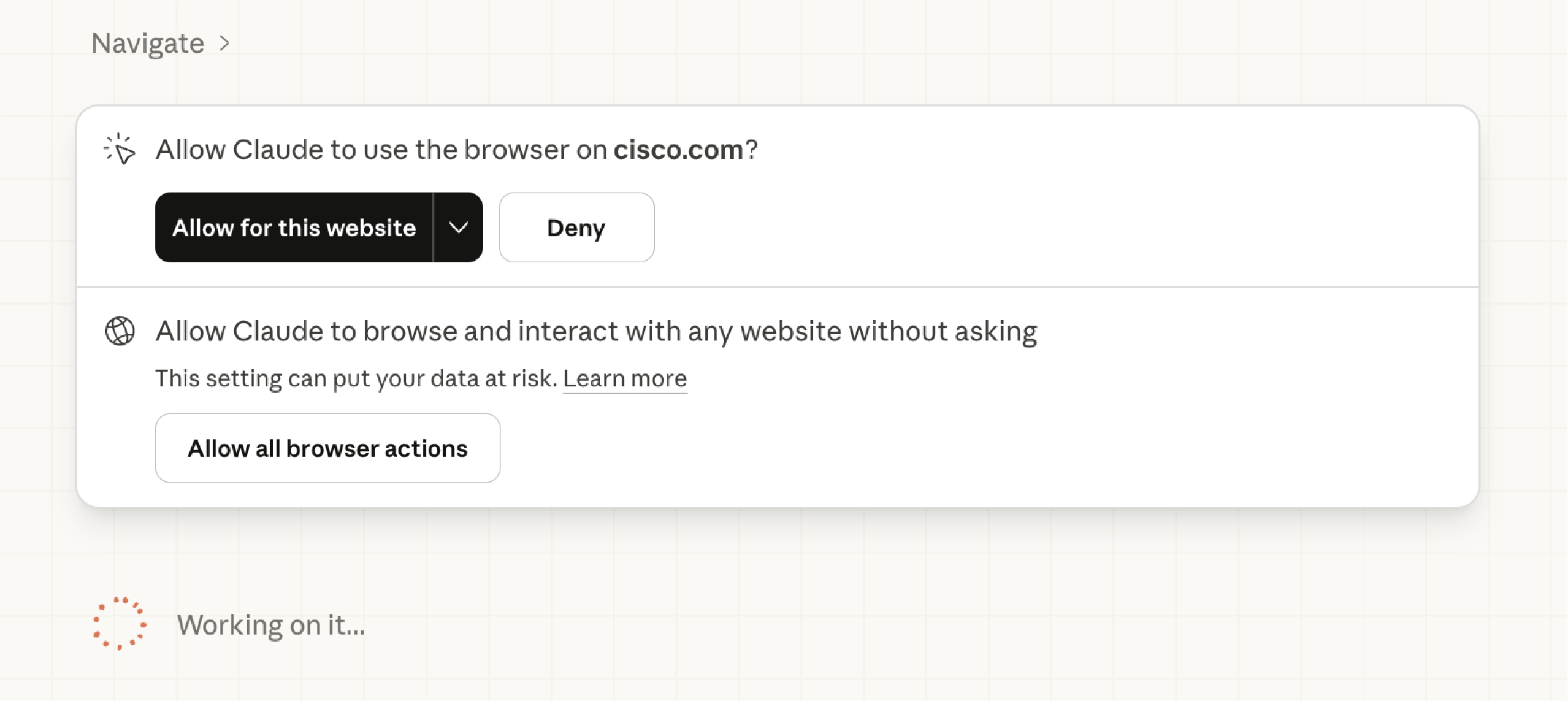
Look at this screenshot carefully.
"Allow Claude to use the browser on cisco.com?"
That's it. That's the entire informed consent model for an AI agent about to operate inside one of the world's largest networking and security companies' web presence. No specification of what actions it plans to take. No disclosure of which credentials it might touch. No indication of whether it's reading a public product page or interacting with a logged-in partner portal. Just: allow or deny.
And if you'd prefer not to be interrupted every time the agent crosses a domain boundary, there's always option two: "Allow all browser actions." Accompanied by the understatement of the year: "This setting can put your data at risk."
This is the binary agentic AI has handed users: interruption theater or a blank check. Neither is acceptable in a security context. A SOC analyst running an agent through threat intel research, pivoting across vendor portals, parsing CVE databases, and querying internal ticketing systems needs permissions scoped to intent, not domain. What is the agent doing? Which data objects is it touching? What credentials is it operating under?
The current model puts the human in the loop for every domain hop while simultaneously offering an escape hatch that removes them entirely. That's not a spectrum. That's a false choice between two failure modes. In a production SOC, neither survives a security review.
UX Bug Parade
Authorization as a durable contract. Auth loops, silent session drops, and account-conflict bugs left hundreds of users unable to start — or restart. Why it matters to SOC tools: a dropped agent mid-investigation is a gap in your detection timeline, not a minor inconvenience.
Session amnesia. Close a tab, sleep the laptop, hit a timeout — everything the agent was working on is gone with no checkpoint or warning. Why it matters to SOC tools: multi-hop alert investigations span tools and sometimes shifts; losing state 40 minutes in is a chain-of-custody problem.
Invisible usage walls. Limits hit mid-task with no warning, no graceful pause, no partial result — just a stop. Browser automation burns tokens 5–10x faster than chat; users had no idea. Why it matters to SOC tools: an agent that silently runs out of capacity during a live incident creates false confidence in a system that has already stopped working.
Prompt injection as a UX problem. Anthropic's own research showed 11–23% injection success rates with safeguards in place — and users have zero visibility into whether the agent is acting on their instructions or the page's. Why it matters to SOC tools: agents browsing adversary infrastructure or parsing untrusted email are operating in a hostile prompt environment by definition.
Interface affordances that don't exist. "What sidebar?" is a real review. Multiple users describe Claude instructing them to click buttons that aren't present in their environment. Why it matters to SOC tools: an agent that can't locate its own controls in a heterogeneous SIEM environment erodes operator trust faster than any model error.
The screenshot tax. Computer-use agents that screenshot-then-act are dramatically slower than native interaction — tasks taking 2 seconds manually can take 2 minutes with the agent watching. Why it matters to SOC tools: triage velocity is a core SOC metric; an agent that slows mean time to respond is working against the mission.
Stability as a prerequisite. Chrome crashes, lost shortcuts on reinstall, sessions requiring a cold reboot — stability failures destroy trust faster than feature gaps. Why it matters to SOC tools: an agent that breaks your existing environment costs more than it saves; in a production SOC that cost is measured in missed detections.
This isn't a Claude problem. It's an Agentic AI category problem.
These are universal agentic AI UX challenges faced by every industry spinning up agents right now. We don't solve them by adding model capability. We solve them with product leaders seriously focused on creating better UX through intelligent problem analysis and rapid iterative AI-first development.
I did this at Sumo Logic, leading a flagship 4-agent autonomous SIEM investigation system from POC to Beta, featured at AWS re:Invent 2025: https://www.sumologic.com/solutions/dojo-ai
More recently, I helped the team at Hackerdogs.ai ship a "3 clicks to attack surface" flow that shows what good agentic security UX actually feels like: https://preview.hackerdogs.ai/
Good agentic experience for cybersecurity can be done when smart people pull together as a team.
The pattern failures are documented.
The gap is leadership. Here's how to close it.
The UX for AI Professional Certification teaches exactly this — how to design, build, and ship agentic AI products using the Snowball Sprint method: a structured approach to 0→1 AI product development built for teams who can't afford to iterate slowly.

Our founding cohort sold out. Our SXSW workshop ran for the fifth consecutive year — twice the turnout, line still out the door.
If the problems in this article made you think I should be the one solving these — you're right. Designers who can solve these Agentic AI UX challenges are the ones getting multiple job offers. If you are ready to become one of these professionals, reserve your spot in the next cohort before it too sells out:
Reply